7
$\begingroup$

When working on 3D plots, I’d like to implement a feature where visible edges are drawn as solid lines and obscured (hidden) edges are drawn as dashed lines. I haven’t found a good solution to this problem—until today, when I came across a post enter link description here describing a function called DashedGraphics3D[]. The post explains it in great detail and the results look quite effective. However, I’ve noticed an issue: for the cylinder shown in the example, its generatrices (the straight lines running along the surface) should appear as dashed lines when hidden and solid lines when visible—but this function doesn’t seem to handle that correctly.

Clear[DashedGraphics3D]
DashedGraphics3D::optx = 
  "Invalid options for Graphics3D are omitted: `1`.";
Off[OptionValue::nodef];
Options[DashedGraphics3D] = {ViewAngle -> 0.4, 
   ViewPoint -> {3, -1, 0.5}, ViewVertical -> {0, 0, 1}, 
   ImageSize -> 800};
DashedGraphics3D[basegraph_, effectFunction_ : Identity, 
   opts : OptionsPattern[]] /; ! 
   MatchQ[Flatten[{effectFunction}], {(Rule | RuleDelayed)[__] ..}] :=
  Module[{basegraphClean = basegraph /. (Lighting -> _) :> Sequence[],
    exceptopts, fullopts, frontlayer, dashedlayer, borderlayer, 
   face3DPrimitives = {Cuboid, Cone, Cylinder, Sphere, Tube, 
     BSplineSurface}}, 
  exceptopts = FilterRules[{opts}, Except[Options[Graphics3D]]];
  If[exceptopts =!= {}, Message[DashedGraphics3D::optx, exceptopts]];
  fullopts = 
   Join[FilterRules[Options[DashedGraphics3D], Except[#]], #] &@
    FilterRules[{opts}, Options[Graphics3D]];
  frontlayer = 
   Show[basegraphClean /. Line[pts__] :> {Thick, Line[pts]} /.
      h_[pts___] /; MemberQ[face3DPrimitives, h] :> {EdgeForm[{Thick}],
         h[pts]}, fullopts, Lighting -> {{"Ambient", White}}] / 
    Rasterize;
  dashedlayer = Show[basegraphClean /.
       {Polygon[__] :> {}, Line[pts__] :> {Dashed, Line[pts]}} /.
      h_[pts___] /; MemberQ[face3DPrimitives, h] :> {FaceForm[], 
        EdgeForm[{Dashed}], h[pts]}, fullopts] / Rasterize;
  borderlayer = 
   Show[basegraphClean /. RGBColor[__] :> Black, 
       ViewAngle -> (1 - .001) OptionValue[ViewAngle], 
       Lighting -> {{"Ambient", Black}}, fullopts, Axes -> False, 
       Boxed -> False] / Rasterize / GradientFilter[#, 1] & / 
    ImageAdjust;
  ImageSubtract[frontlayer, dashedlayer] / effectFunction / 
      ImageAdd[frontlayer / ColorNegate, #] & / 
     ImageAdd[#, borderlayer] & / ColorNegate / ImageCrop]
graph1 = 
  Show[{SphericalPlot3D[
     1, {\[Theta], 1/5 1.2 \[Pi], \[Pi]/2}, {\[Phi], 0, 1.8 \[Pi]}, 
     PlotStyle -> White, PlotPoints -> 50, Mesh -> None, 
     BoundaryStyle -> Black], 
    SphericalPlot3D[
     1, {\[Theta], 0, \[Pi]/5}, {\[Phi], \[Pi]/4, 2.1 \[Pi]}, 
     PlotStyle -> FaceForm[Lighter[Blue, .9], GrayLevel[.9]], 
     PlotPoints -> 50, Mesh -> None, BoundaryStyle -> Black], 
    Graphics3D[{FaceForm[Lighter[Pink, .8], GrayLevel[.8]], 
      Cylinder[{{0, 0, 0}, {0, 0, .8 Cos[\[Pi]/5]}}, Sin[\[Pi]/5]]}]},
    PlotRange -> 1.2 {{-1, 1}, {-1, 1}, {0, 1}}, 
   AxesOrigin -> {0, 0, 0}, Boxed -> False, SphericalRegion -> True];

DashedGraphics3D[graph1]

The excellent answerer mentioned a sentence in their response: "The hidden border of the cylinder's side-wall can not be extracted by the "shadow" method (described below) used in DashedGraphics3D[ ], so ParametricPlot3D[ ]-akin functions are needed instead of simply Cylinder[ ].". However, after I replaced the relevant code snippet with a parametric plot, the visual result was unsatisfactory. Therefore, I’d like to ask: what exactly did that sentence mean , and how should I proceed to properly render the cylinder's generatrices?

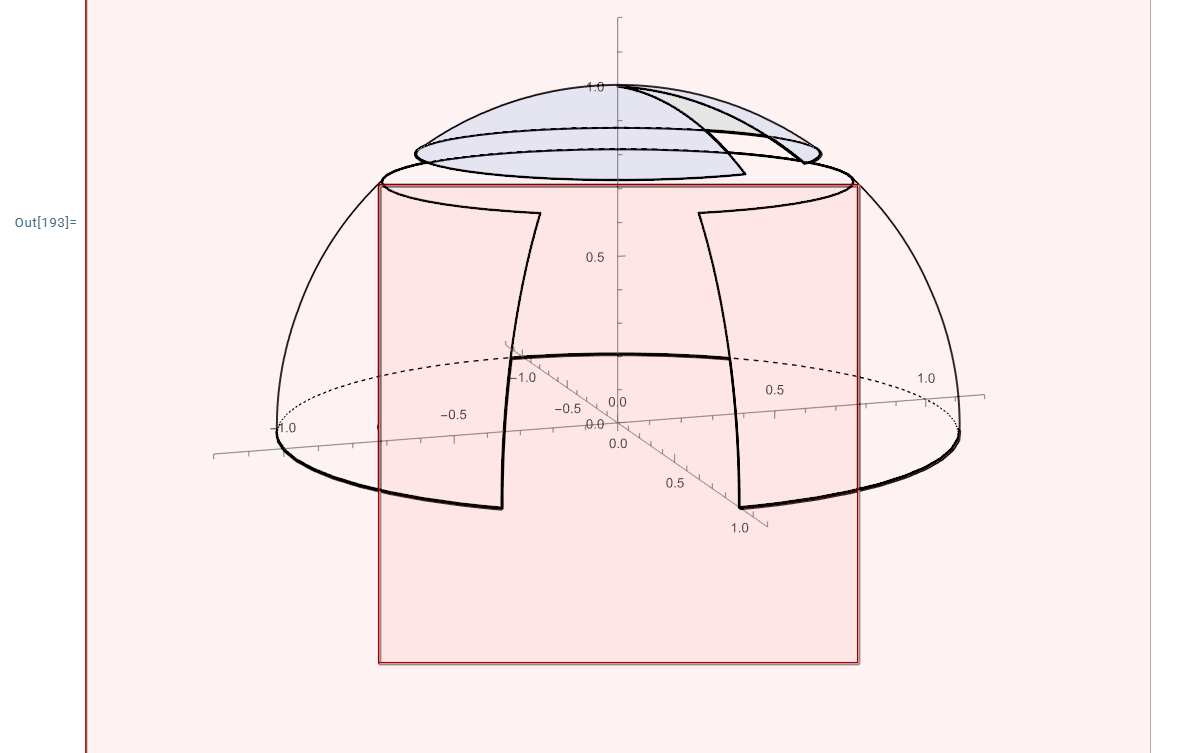
Here is my code after replacing Cylinder[] with ParametricPlot3D[], and the resulting plot is shown in the figure below. As can be seen, the rendered graphic is not satisfactory.

  graph2 = 
      Show[{SphericalPlot3D[
         1, {\[Theta], 1/5 1.2 \[Pi], \[Pi]/2}, {\[Phi], 0, 1.8 \[Pi]}, 
         PlotStyle -> White, PlotPoints -> 50, Mesh -> None, 
         BoundaryStyle -> Black], 
        SphericalPlot3D[
         1, {\[Theta], 0, \[Pi]/5}, {\[Phi], \[Pi]/4, 2.1 \[Pi]}, 
         PlotStyle -> FaceForm[Lighter[Blue, .9], GrayLevel[.9]], 
         PlotPoints -> 50, Mesh -> None, BoundaryStyle -> Black], 
        Graphics3D[{FaceForm[Lighter[Pink, .8], GrayLevel[.8]], 
          ParametricPlot3D[{Cos[\[Theta]], Sin[\[Theta]], z}, {\[Theta], 
            0, 2 \[Pi]}, {z, 0, 2}]}]}, 
       PlotRange -> 1.2 {{-1, 1}, {-1, 1}, {0, 1}}, 
       AxesOrigin -> {0, 0, 0}, Boxed -> False, SphericalRegion -> True];
    
    DashedGraphics3D[graph2]

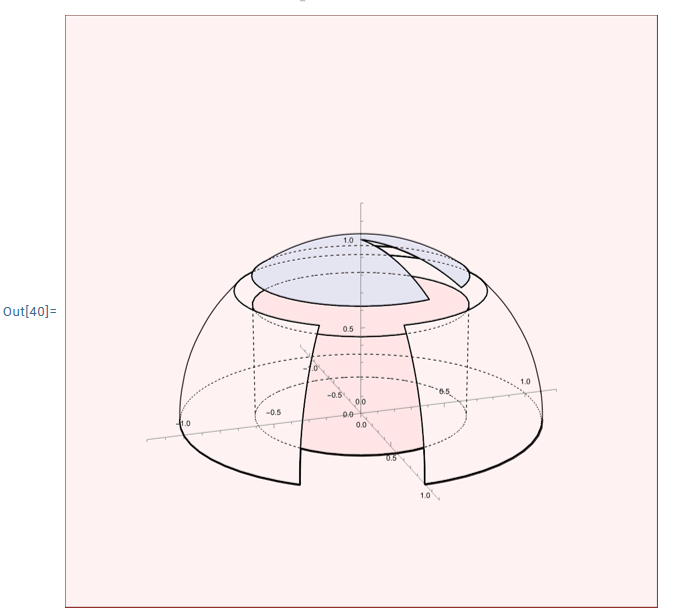
Today,I fed my question into an AI and asked it for a solution. The AI provided a piece of code that is supposed to process the silhouette of the cylinder. However, when I ran it in Mathematica 14.3, the output graphic appeared pink—likely indicating that something is wrong with the code. Yet, no error messages were displayed. I’m not sure where the issue lies in this code that causes the output to be rendered in pink.

ClearAll[DashedGraphics3D, cylinderSilhouetteLines]

DashedGraphics3D::optx = 
  "Invalid options for Graphics3D are omitted: `1`.";
Off[OptionValue::nodef];

Options[DashedGraphics3D] = {ViewAngle -> 0.4, 
   ViewPoint -> {3, -1, 0.5}, ViewVertical -> {0, 0, 1}, 
   ImageSize -> 800, EffectFunction -> Identity };

cylinderSilhouetteLines[Cylinder[{p1_, p2_}, r_], 
  viewPoint_?VectorQ] := 
 Module[{axis, v, vPerp, dir, t1, t2}, axis = p2 - p1;
  If[Norm[axis] < 10^-6, Return[{}]];
  axis = Normalize[axis];
  v = Normalize[viewPoint - (p1 + p2)/2];
  vPerp = v - (v . axis) axis;
  If[Norm[vPerp] < 10^-6, {}, dir = Normalize[Cross[axis, vPerp]];
   t1 = {p1 + r dir, p2 + r dir};
   t2 = {p1 - r dir, p2 - r dir};
   {Line[t1], Line[t2]}]]

DashedGraphics3D[basegraph_, opts : OptionsPattern[]] := 
 Module[{basegraphClean, exceptopts, fullopts, frontlayer, 
   dashedlayer, borderlayer, viewPoint, 
   effectFunction = OptionValue[EffectFunction], 
   face3DPrimitives = {Cuboid, Cone, Cylinder, Sphere, Tube, 
     BSplineSurface}},
  viewPoint = OptionValue[ViewPoint];
  If[! VectorQ[viewPoint, NumericQ], viewPoint = {3, -1, 0.5}];
  
  basegraphClean = basegraph /. Lighting -> Sequence[];
  basegraphClean = 
   basegraphClean /. 
    cyl : (Cylinder[{{_?NumericQ, _?NumericQ, _?NumericQ}, {_?
           NumericQ, _?NumericQ, _?NumericQ}}, _?NumericQ]) :> {cyl, 
      cylinderSilhouetteLines[cyl, viewPoint]};
  
  exceptopts = FilterRules[{opts}, Except[Options[Graphics3D]]];
  If[exceptopts =!= {}, Message[DashedGraphics3D::optx, exceptopts]];
  fullopts = 
   Join[FilterRules[Options[DashedGraphics3D], Except[#]], #] &@
    FilterRules[{opts}, Options[Graphics3D]];
  
  frontlayer = 
   Show[basegraphClean /. Line[pts__] :> {Thick, Line[pts]} /.
      h_[pts___] /; MemberQ[face3DPrimitives, h] :> {EdgeForm[{Thick}],
         h[pts]}, fullopts, Lighting -> {{"Ambient", White}}] / 
    Rasterize;
  dashedlayer = 
   Show[basegraphClean /. {Polygon[__] :> {}, 
        Line[pts__] :> {Dashed, Line[pts]}} /. 
      h_[pts___] /; MemberQ[face3DPrimitives, h] :> {FaceForm[], 
        EdgeForm[{Dashed}], h[pts]}, fullopts] / Rasterize;
  borderlayer = 
   Show[basegraphClean /. RGBColor[__] :> Black, 
       ViewAngle -> (1 - .001) OptionValue[ViewAngle], 
       Lighting -> {{"Ambient", Black}}, fullopts, Axes -> False, 
       Boxed -> False] / Rasterize / GradientFilter[#, 1] & / 
    ImageAdjust;

  ImageSubtract[frontlayer, dashedlayer] / effectFunction / 
      ImageAdd[frontlayer / ColorNegate, #] & / 
     ImageAdd[#, borderlayer] & / ColorNegate / ImageCrop]
graph1 = 
  Show[{SphericalPlot3D[
     1, {\[Theta], 1/5 1.2 \[Pi], \[Pi]/2}, {\[Phi], 0, 1.8 \[Pi]}, 
     PlotStyle -> White, PlotPoints -> 50, Mesh -> None, 
     BoundaryStyle -> Black], 
    SphericalPlot3D[
     1, {\[Theta], 0, \[Pi]/5}, {\[Phi], \[Pi]/4, 2.1 \[Pi]}, 
     PlotStyle -> FaceForm[Lighter[Blue, .9], GrayLevel[.9]], 
     PlotPoints -> 50, Mesh -> None, BoundaryStyle -> Black], 
    Graphics3D[{FaceForm[Lighter[Pink, .8], GrayLevel[.8]], 
      Cylinder[{{0, 0, 0}, {0, 0, .8 Cos[\[Pi]/5]}}, Sin[\[Pi]/5]]}]},
    PlotRange -> 1.2 {{-1, 1}, {-1, 1}, {0, 1}}, 
   AxesOrigin -> {0, 0, 0}, Boxed -> False, SphericalRegion -> True];

DashedGraphics3D[graph1, ViewPoint -> {3, -1, 1}]

$\endgroup$
5
  • $\begingroup$ The graph2 does not work since Graphics3D[{FaceForm[Lighter[Pink, .8], GrayLevel[.8]], ParametricPlot3D[{Cos[θ], Sin[θ], z}, {θ, 0, 2 π}, {z, 0, 2}]}] get the error message. $\endgroup$ Commented Dec 1 at 14:44
  • $\begingroup$ When using AI for producing Mathematica code, one many times gets code with errors. You have to tell the AI program that you got an error. You'll get a response like "Thanks for pointing that out. Because you used X you need to do Y. Here is some updated code." Then lather, rinse, repeat. $\endgroup$ Commented Dec 2 at 4:32
  • $\begingroup$ @King.Max Is it worth for such a poor graphic quality? I would do it manually without rasterizing for a single instance. Do you need it for many different instances? $\endgroup$ Commented Dec 2 at 7:54
  • $\begingroup$ Yes, I plan to use this function to process a large number of geometric instances.@azerbajdzan $\endgroup$ Commented Dec 2 at 8:20
  • 1
    $\begingroup$ Use a CAD system. They all have functions for doing hidden line identification. $\endgroup$ Commented Dec 2 at 11:15

3 Answers 3

9
$\begingroup$

Method-1

If we re-write the ParametricPlot3D code about the cylinder, we get

plot = ParametricPlot3D[{Sin[π/5]*Cos[θ], 
   Sin[π/5]*Sin[θ], z}, {θ, 0, 2 π}, {z, 
   0, .8 Cos[π/5]}, MeshFunctions -> {#3 &}, 
  Mesh -> {{0, .8 Cos[π/5]}}, 
  Method -> {"BoundaryOffset" -> False}, MeshStyle -> Thick]

then the result is correct.

graph2 = 
  Show[{SphericalPlot3D[
     1, {θ, 1/5 1.2 π, π/2}, {ϕ, 0, 1.8 π}, 
     PlotStyle -> White, PlotPoints -> 50, Mesh -> None, 
     BoundaryStyle -> Black], 
    SphericalPlot3D[
     1, {θ, 0, π/5}, {ϕ, π/4, 2.1 π}, 
     PlotStyle -> FaceForm[Lighter[Blue, .9], GrayLevel[.9]], 
     PlotPoints -> 50, Mesh -> None, BoundaryStyle -> Black], 
    Graphics3D[{FaceForm[Lighter[Pink, .8], GrayLevel[.8]], plot[[1]]}]},
    PlotRange -> 1.2 {{-1, 1}, {-1, 1}, {0, 1}}, 
   AxesOrigin -> {0, 0, 0}, Boxed -> False, SphericalRegion -> True];

DashedGraphics3D[graph2]

Method-2

g1 = SphericalPlot3D[
   1, {θ, 1/5 1.2 π, π/2}, {ϕ, 0, 1.8 π}, 
   PlotStyle -> White, PlotPoints -> 50, Mesh -> None, 
   BoundaryStyle -> Black];
g11 = SphericalPlot3D[
   1, {θ, 1/5 1.2 π, π/2}, {ϕ, 0, 1.8 π}, 
   PlotPoints -> 50, Mesh -> None, PlotStyle -> None, 
   BoundaryStyle -> Black, Axes -> False, Boxed -> False];
g2 = SphericalPlot3D[
   1, {θ, 0, π/5}, {ϕ, π/4, 2.1 π}, 
   PlotStyle -> FaceForm[Lighter[Blue, .9], GrayLevel[.9]], 
   PlotPoints -> 50, Mesh -> None, BoundaryStyle -> Black];
g22 = SphericalPlot3D[
   1, {θ, 0, π/5}, {ϕ, π/4, 2.1 π}, 
   PlotStyle -> None, PlotPoints -> 50, Mesh -> None, 
   BoundaryStyle -> Black];
g3 = Graphics3D[{FaceForm[Lighter[Pink, .8], GrayLevel[.8]], 
    EdgeForm[Directive@{Thick, Black}], 
    Cylinder[{{0, 0, 0}, {0, 0, .8 Cos[π/5]}}, Sin[π/5]]}];
g33 = Graphics3D[{FaceForm[], EdgeForm[Directive@{Thick, Dashed}], 
    Cylinder[{{0, 0, 0}, {0, 0, .8 Cos[π/5]}}, Sin[π/5]]}];
DynamicModule[{vp = {1.6, -.3, .3}, vv = {0, 0, 1}, 
  vc = {0.5, 0.5, 0.5}, va = 40 °}, 
 SetOptions[Graphics3D, ViewPoint -> Dynamic@vp, 
  ViewVertical -> Dynamic@vv, ViewCenter -> Dynamic@vc, 
  ViewAngle -> Dynamic@va, Boxed -> False];
 Overlay[{Graphics3D[{{g1[[1]], g2[[1]]}, g3[[1]], Thick, Black, 
     g11[[1]], g22[[1]], g33[[1]]}], 
   Graphics3D[{{Transparent, g1[[1]], g2[[1]]}, g33[[1]], Thick, 
     Dashed, g11[[1]], g22[[1]], g33[[1]]}]}, ;; , 1]]

$\endgroup$
5
  • 1
    $\begingroup$ But the cylinder lacks side contours - the main concern of OP. $\endgroup$ Commented Dec 1 at 20:17
  • $\begingroup$ As mentioned in the comment above, the obscured generatrices of the cylinder still do not appear as dashed lines. $\endgroup$ Commented Dec 2 at 0:07
  • $\begingroup$ @King.Max It is the silhouette of the cylinder, not the fixed boundary. I think there are no general way to draw the silhouette of solid as dashed line. $\endgroup$ Commented Dec 2 at 2:57
  • $\begingroup$ I just used AI-assisted programming and seem to have partially solved the problem—the generatrices (contour lines) of the cylinder are now visible. However, I don’t understand why the output graphic appears pink; this likely indicates an issue somewhere in the code. Strangely, Mathematica didn’t show any error messages. I’m not sure where the problem lies.@cvgmt $\endgroup$ Commented Dec 2 at 3:49
  • $\begingroup$ I have just edited my question: I added the program written by AI and the output image. $\endgroup$ Commented Dec 2 at 3:51
2
$\begingroup$

Good news! After persistent back-and-forth communication with the AI, I've finally resolved the issue of the cylinder's generatrices not appearing. The code and the rendered graphic are shown below. However, a new problem has emerged: although I set both the surface color and lighting to white, the generated surface still appears colored.

ClearAll[DashedGraphics3D, cylinderSilhouetteLines]

DashedGraphics3D::optx = 
  "Invalid options for Graphics3D are omitted: `1`.";
Off[OptionValue::nodef];

Options[DashedGraphics3D] = {ViewAngle -> 0.4, 
   ViewPoint -> {3, -1, 0.5}, ViewVertical -> {0, 0, 1}, 
   ImageSize -> 800, EffectFunction -> Identity};

cylinderSilhouetteLines[Cylinder[{p1_, p2_}, r_], 
  viewPoint_?VectorQ] := 
 Module[{axis, v, vPerp, dir, t1, t2}, axis = p2 - p1;
  If[Norm[axis] < 10^-6, Return[{}]];
  axis = Normalize[axis];
  v = Normalize[viewPoint - (p1 + p2)/2];
  vPerp = v - (v . axis) axis;
  If[Norm[vPerp] < 10^-6, {}, dir = Normalize[Cross[axis, vPerp]];
   t1 = {p1 + r dir, p2 + r dir};
   t2 = {p1 - r dir, p2 - r dir};
   {Line[t1], Line[t2]}]]

DashedGraphics3D[basegraph_, opts : OptionsPattern[]] := 
 Module[{basegraphClean, exceptopts, fullopts, frontlayer, 
   dashedlayer, borderlayer, viewPoint, effectFunction, 
   silhouetteLines}, effectFunction = OptionValue[EffectFunction];
  viewPoint = 
   Replace[OptionValue[ViewPoint], 
    Except[_List?(VectorQ[#, NumericQ] &)] :> {3, -1, 0.5}];
  silhouetteLines = 
   Reap[basegraph /. 
        cyl : (Cylinder[{_?VectorQ, _?VectorQ}, _?NumericQ]) :> 
         Sow[cylinderSilhouetteLines[cyl, viewPoint]]][[2, 1]] / 
     Flatten / DeleteCases[{}];
  basegraphClean = Show[basegraph, Graphics3D[silhouetteLines]];
  exceptopts = FilterRules[{opts}, Except[Options[Graphics3D]]];
  If[exceptopts =!= {}, Message[DashedGraphics3D::optx, exceptopts]];
  fullopts = 
   Join[FilterRules[Options[DashedGraphics3D], Except[#]], #] &@
    FilterRules[{opts}, Options[Graphics3D]];
  frontlayer = 
   Show[basegraphClean, 
       Graphics3D[{}, BaseStyle -> {Black}, 
        Lighting -> AmbientLight[White]], fullopts, Boxed -> False, 
       Axes -> False, 
       RenderingOptions -> {"DepthPeelingLayers" -> 
          10}] /. {(h_ /; 
           MemberQ[{Cuboid, Cone, Cylinder, Sphere, Tube, 
             BSplineSurface}, h])[pts___] :> {EdgeForm[{Thick, Black}],
          FaceForm[White], h[pts]}, 
       Line[pts__] :> {Thick, Black, Line[pts]}} / 
     Rasterize[#, Background -> White, ImageResolution -> 120] & / 
    ColorConvert[#, "RGB"] &;
  dashedlayer = 
   Show[basegraphClean, Graphics3D[{}, Lighting -> AmbientLight[White]],
        fullopts, Boxed -> False, 
       Axes -> False] /. {Polygon[__] :> 
        Sequence[], (h_ /; 
           MemberQ[{Cuboid, Cone, Cylinder, Sphere, Tube, 
             BSplineSurface}, h])[pts___] :> {FaceForm[], 
         EdgeForm[{Dashed, Black}], h[pts]}, 
       Line[pts__] :> {Dashed, Black, Line[pts]}} / 
     Rasterize[#, Background -> White, ImageResolution -> 120] & / 
    ColorConvert[#, "RGB"] &;
  borderlayer = 
   Show[basegraphClean /. _?ColorQ :> Black, 
        ViewAngle -> (1 - 0.001) OptionValue[ViewAngle], 
        Lighting -> AmbientLight[White], fullopts, Boxed -> False, 
        Axes -> False] / 
       Rasterize[#, Background -> White, ImageResolution -> 120] & / 
      GradientFilter[#, 1] & / ImageAdjust / 
    ColorConvert[#, "RGB"] &;
  ImageSubtract[frontlayer, dashedlayer] / effectFunction / 
      ImageAdd[ColorNegate[frontlayer], #] & / 
     ImageAdd[#, borderlayer] & / ColorNegate / ImageCrop]

graph1 = 
  Show[{SphericalPlot3D[
     1, {\[Theta], 1/5 1.2 \[Pi], \[Pi]/2}, {\[Phi], 0, 1.8 \[Pi]}, 
     PlotStyle -> White, PlotPoints -> 50, Mesh -> None, 
     BoundaryStyle -> Black], 
    SphericalPlot3D[
     1, {\[Theta], 0, \[Pi]/5}, {\[Phi], \[Pi]/4, 2.1 \[Pi]}, 
     PlotStyle -> FaceForm[Lighter[White, .9], GrayLevel[.9]], 
     PlotPoints -> 50, Mesh -> None, BoundaryStyle -> Black], 
    Graphics3D[{FaceForm[Lighter[White, .8], GrayLevel[.8]], 
      Cylinder[{{0, 0, 0}, {0, 0, .8 Cos[\[Pi]/5]}}, Sin[\[Pi]/5]]}]},
    PlotRange -> 1.2 {{-1, 1}, {-1, 1}, {0, 1}}, 
   AxesOrigin -> {0, 0, 0}, Boxed -> False, SphericalRegion -> True];

DashedGraphics3D[graph1, ViewPoint -> {3, -1, 0.8}]

$\endgroup$
1
  • $\begingroup$ AI produces a mess code. $\endgroup$ Commented 2 days ago
0
$\begingroup$

We use ResourceFunction["Graphics3DSketch"] and OP's AI code cylinderSilhouetteLines (stolen from unknown source).

amb = {{"Ambient", White}}; (* ambient lighting *)
vp = {3, -1, 0.5}; (* view point *)

basegraph = 
 Show[{SphericalPlot3D[
    1, {θ, 0.24 Pi, Pi/2}, {Φ, 0, 1.8 Pi}, 
    PlotStyle -> White, PlotPoints -> 50, Mesh -> None, 
    BoundaryStyle -> Black, Lighting -> amb], 
   SphericalPlot3D[
    1, {θ, 0, Pi/5}, {Φ, Pi/4, 2.1 Pi}, 
    PlotStyle -> FaceForm[Lighter[Blue, .5], GrayLevel[.9]], 
    PlotPoints -> 50, Mesh -> None, BoundaryStyle -> Black, 
    Lighting -> amb], 
   Graphics3D[{FaceForm[Lighter[Pink, .8], GrayLevel[.8]], 
     Cylinder[{{0, 0, 0}, {0, 0, .8 Cos[Pi/5.]}}, Sin[Pi/5.]]}, 
    Lighting -> amb]}, PlotRange -> 1.2 {{-1, 1}, {-1, 1}, {0, 1}}, 
  Axes -> False, Boxed -> False, SphericalRegion -> True]

cylinderSilhouetteLines[Cylinder[{p1_, p2_}, r_], 
  viewPoint_?VectorQ] := 
 Module[{axis, v, vPerp, dir, t1, t2}, axis = p2 - p1;
  If[Norm[axis] < 10^-6, Return[{}]];
  axis = Normalize[axis];
  v = Normalize[viewPoint - (p1 + p2)/2];
  vPerp = v - (v . axis) axis;
  If[Norm[vPerp] < 10^-6, {}, dir = Normalize[Cross[axis, vPerp]];
   t1 = {p1 + r dir, p2 + r dir};
   t2 = {p1 - r dir, p2 - r dir};
   {Line[t1], Line[t2]}]]

ResourceFunction["Graphics3DSketch"][
 Replace[basegraph, 
  Cylinder[x___] :> {Cylinder[x], 
    cylinderSilhouetteLines[Cylinder[x], vp]}, All], ViewPoint -> vp, 
 "DashStyle" -> {Dashing[.005]}]

$\endgroup$

Your Answer

By clicking “Post Your Answer”, you agree to our privacy policy.

Start asking to get answers

Find the answer to your question by asking.

Ask question

Explore related questions

See similar questions with these tags.