chrome://tracing view of a 2 seconds Jank on AutocompleteController::UpdateResult() on an otherwise healthy machine


We have a culprit! Let’s optimize AutocompleteController? No! We don’t know why yet: keep assuming ignorance!

By augmenting BackgroundTracing with stack sampling, we were able to find a recurring stack under stalled AutoComplete events:

    RegEnumValueW

    RegEnumValueWStub

    base::win::RegistryValueIterator::Read()

    gfx::`anonymous namespace\'::CachedFontLinkSettings::GetLinkedFonts

    gfx::internal::LinkedFontsIterator::GetLinkedFonts()

    gfx::internal::LinkedFontsIterator::NextFont(gfx::Font *)

    gfx::GetFallbackFonts(gfx::Font const &)

    gfx::RenderTextHarfBuzz::ShapeRuns(...)

    gfx::RenderTextHarfBuzz::ItemizeAndShapeText(...)

    gfx::RenderTextHarfBuzz::EnsureLayoutRunList()

    gfx::RenderTextHarfBuzz::EnsureLayout()

    gfx::RenderTextHarfBuzz::GetStringSizeF()

    gfx::RenderTextHarfBuzz::GetStringSize()

    OmniboxTextView::CalculatePreferredSize()

    OmniboxTextView::ReapplyStyling()

    OmniboxTextView::SetText...)

    OmniboxResultView::Invalidate()

    OmniboxResultView::SetMatch(AutocompleteMatch const &)

    OmniboxPopupContentsView::UpdatePopupAppearance()

    OmniboxPopupModel::OnResultChanged()

    OmniboxEditModel::OnCurrentMatchChanged()

    OmniboxController::OnResultChanged(bool)

    AutocompleteController::UpdateResult(bool,bool)

    AutocompleteController::Start(AutocompleteInput const &)

    (...)


Ah ha! Autocomplete is not at fault. Time to optimize GetFallbackFonts()?! But wait… Why is GetFallbackFonts() even called in the first place?

And before we figure that out, how do we know this is the #1 root cause of our overall long-tail performance issue? We’ve only looked at one trace so far after all...


The Measurement Conundrum

The metrics tell us how many users are affected and how bad it is, but they do not highlight the root cause.

Slow Reports tell us what the problem is for a specific user but not how many users are affected. And while we can query our corpus of Slow Report traces, it comes with inherent biases that make it impossible to correlate 1:1 with metrics. For instance, because Chrome only reports the first instance of bad performance per-session and only for users of the Canary/Dev channel, there’s both a startup and a population bias.

This is the measurement conundrum. The more actionability (data) a tool provides, the fewer scenarios it captures and the more bias it incurs. Depth vs. breadth.

Tools that attempt to do both sit somewhere in the middle, where they use aggregation over a large dataset and risk showing aggregate results based on flawed input (e.g. circular buffer tracing having dropped the interesting portion and contributing to a biased aggregate).

DirectWrite; however, DirectWrite was added in Windows 7, when Chrome still supported Windows XP. Therefore the GetFallbackFont() logic was forced to stick to a less reliable


Still not zero though, and still seeing instances of the aforementioned AutoComplete issue in our Slow Reports. Keep digging. DirectWrite’s GetFallbackFont() failing was unexpected, but since Slow Reports are anonymized, no user-generated strings can be uploaded -- and therefore, finding which codepoints were problematic was tricky. We teamed up with our privacy experts to instrument Unicode Block and Script of text blocks going through segmentation logic which incorrectly broke down these two
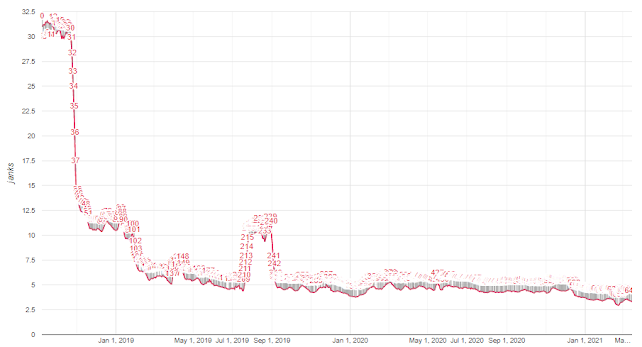
99th percentile of # of unresponsive 100ms intervals over a 30 seconds sample


Posted by Gabriel Charette 🤸🏼 and Etienne Bergeron 🕵🏻, Chrome Software Engineers

Data source for all statistics: Real-world data anonymously aggregated from Chrome clients.


Background

Chrome is a multi-platform, multi-process, multi-threaded application, serving a wide range of needs, from small embedded scudo on Android, and slab-based allocator to conserve memory, with a minimal per-thread cache in front for scaling to multi-threaded workloads. This simplicity also pays performance dividends: we’ve extensively profiled and aggressively trimmed the allocator’s fast path, improving thread-local storage access, locks, reducing cache line fetches, and removing branches.

PartitionAlloc pre-reserves slabs of virtual address space. They are gradually backed by physical memory, as allocation requests arrive. Small and medium-sized allocations are grouped in geometrically-spaced, size-segregated buckets, e.g. [241; 256], [257; 288]. Each slab is split into regions (called “slot spans”) that satisfy allocations (“slots”) from only one particular bucket, thereby increasing cache locality while lowering fragmentation. Conversely, larger allocations don’t go through the bucket logic and are fulfilled using the operating system’s primitives directly (mmap() on thread-local storage lookup, improving cache locality in the process. The per-thread cache has been tailored to satisfy the majority of requests by allocating from and releasing memory to the second layer in batches, amortizing lock acquisition, and further improving locality while not trapping excess memory.

The second layer (Slot span free-lists) is invoked upon a per-thread cache miss. For each bucket size, PartitionAlloc knows a slot span with free slots associated with that size, and captures a slot from the free-list of that span. This is still a fast path, but slower than per-thread cache as it requires taking a lock. However, this section is only hit for larger allocations not supported by per-thread cache, or as a batch to fill the per-thread cache.

Finally, if there are no free slots in the bucket, the third layer (Slot span management) either carves out space from a slab for a new slot span, or allocates an entirely new slab from the operating system, which is a slow but very infrequent operation.

The overall performance and space-efficiency of the allocator hinges on the many tradeoffs across its layers such as how much to cache, how many buckets, and memory reclaiming policy. Please refer to Real-world data anonymously aggregated from Chrome clients.
*The core metric measures jank -- delay handling user input -- every 30 seconds.


It doesn’t look like much, but I recognized immediately that the 124 samples in KiPageFault were worth investigating. Most of the CPU-intensive work in this trace was important and unavoidable work but I had a hunch that these samples represented avoidable work - something that I could fix. And, even though they represented just 0.75% of the samples I suspected that they indicated a somewhat greater cost.

I recognized their importance immediately because this is something that I have seen before.
hidden costs of memory allocation in a 2014 blog post. The basic memory architecture of Windows hasn’t changed since then so the hidden costs remain about the same.

In addition to CPU samples my ETW trace contained call stacks for every call to VirtualAlloc. This WPA screenshot shows a 10-second period where the OnSample function does 298 allocations that are each 1.320 MB, roughly 30 per second:

backported to M84.

You’d have to be paying very close attention to see the difference - spread across a Chrome process and the system process - but I hope that this helped some computers run a bit cooler and last longer on their batteries. And, while this inefficiency was found by profiling Google Meet, the improvement actually benefits any product that uses the webcam inside Chrome (and other Chromium-based browsers).

Verification

After the fix landed I compared two 10-second ETW traces from Chrome Canary before and after the change, each taken with no other programs running except a single Chrome tab running the Google Meet pre-meeting page. In both cases I looked at a 10-second period of time in the profiler. This showed:

CPU time in OnSample:
Before: 458 ms (432 ms of which were in Lock/Unlock/KiPageFault)
After: 27 ms


Allocations:
Before: 30 allocations per second of 1.32 MB (one per frame, running at 30 fps - a higher framerate would mean more allocations), totalling 396 MB over 10 seconds
After: 0 allocations


CPU time in the System process's MiZeroPageThread:
Before: 36 ms
After: 0 ms

These measurements showed - in three different ways - that the performance problem was fixed. The memory copying in OnSample was gone, the repeated allocations were gone, and the system process was doing less work. Mission accomplished, bug closed.

Follow Lee on X/Twitter - Father, Husband, Serial builder creating AI, crypto, games & web tools. We are friends :) AI Will Come To Life!

Check out: eBank.nz (Art Generator) | Netwrck.com (AI Tools) | Text-Generator.io (AI API) | BitBank.nz (Crypto AI) | ReadingTime (Kids Reading) | RewordGame | BigMultiplayerChess | WebFiddle | How.nz | Helix AI Assistant